@vsx-devsense/profiler-php-vscode
Public// Description
Support for PHP (Xdebug) profiling files and inspecting them.
// Readme
Open VSX#PHP Profiler for Visual Studio Code

Xdebug profile files (cachegrind format) can be opened, viewed, and inspected. The extension also highlights hot paths in your code, according to the profiling results. There is more, please see the features below for the details.
##Overview
PHP code profiling allows you to inspect how much time and how many calls were made to every single function in the code.

The extension enables inspecting of Xdebug profile files which contain information about PHP code performance. It works best in combination with PHP Tools for Visual Studio Code. Debug, profile, and inspect the profiling results right in Visual Studio Code.
###Quickly Setup PHP for Profiling
- ›Ensure, you have PHP installed.
- ›Ensure Xdebug PHP extension is installed as well.
- ›Make sure PHP
zlibextension is enabled (recommended). - ›With PHP Tools for Visual Studio Code, use the following
launch.jsonsetting:{ "name": "Launch Built-in server & Profile", "type": "php", "request": "launch", "runtimeArgs": [ "-S", "localhost:8888", "-t", "." ], "noDebug": true, // <-- disable debugging "profile": true, // <-- enable profiling }
##Opening Profiling Result
Open the file containing your profiling data. By default, it is in form of cachegrind.out.%p.gz.
Using Command Palette
- ›Bring the Command Palette, and run
Open Profile File (Xdebug Profiling Output). - ›Choose the file, and confirm.

Drag & Drop "cachegrind.out.*.gz" File
Alternatively, if your profile file name is in form of cachegrind.out.%p.gz, you can open the file right in the Visual Studio Code editor - using File/Open File menu.
Be aware, large files may take some time to open.
##Inspecting Call Times
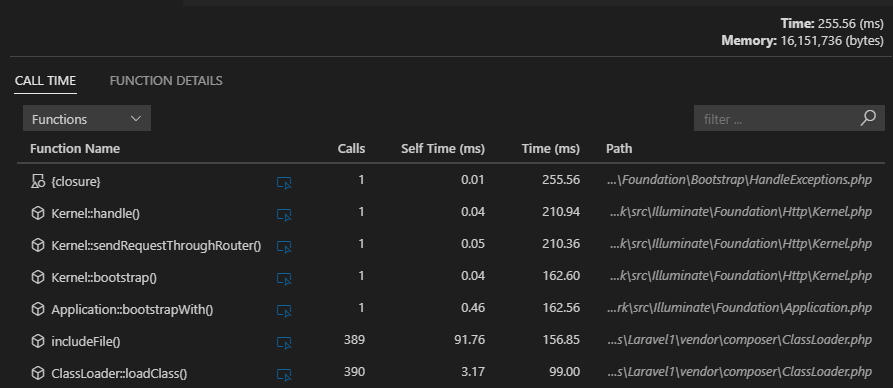
The following view lists all the functions with the number of calls (Calls), time spent by the function body (Self Time), and time including nested calls (Time).
##Inspecting Callers/Callees
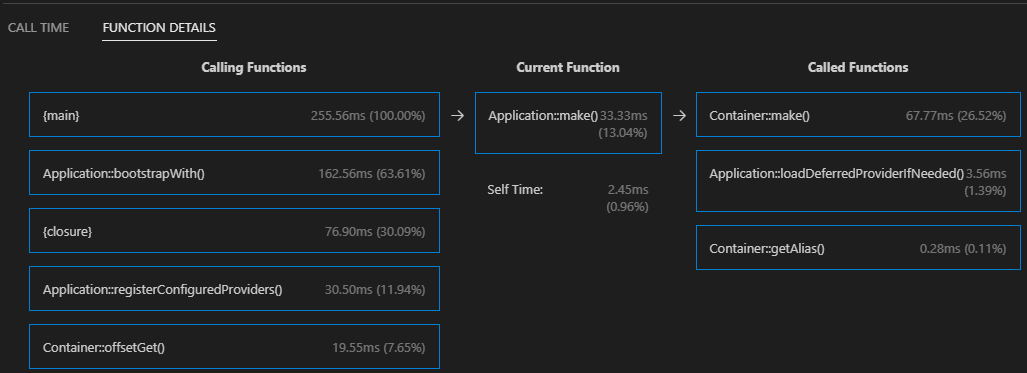
The Function Details view is focused on a single function; and displays all the calling functions and all the called functions, including the time information.
##Highlighting Hot Paths
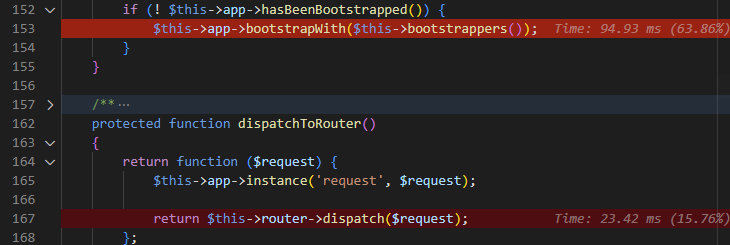
The loaded profiling result file is analyzed, and hot paths are highlighted directly in the source code. Highlighting can be turned off in the profiling result view.
##See Also
- ›PHP Tools for Visual Studio - All-in-One PHP language integration for VS Code.
- ›Profiling Documentation
- ›Documentation
- ›Pricing - Purchase PREMIUM version of PHP Tools including the Profiler.
##Notes
The extension may send us (DEVSENSE s.r.o.) error telemetries, if enabled in VS Code (see Telemetry settings). Data are anonymized, sampled, and destroyed after 30 days. This helps us to make the product stable and reliable. We do not provide the data to any 3rd party.
// Install
Open this extension directly in your IDE — no CLI, no extra tools.
devsense.profiler-php-vscodeIf your IDE doesn't open automatically, copy the ID above and paste it into the Extensions view (⌘P → ext install <id>).
// Source signals
- Publisher
- Verified ✓
- Rating
- 5.0 (2)
- Downloads
- 41.0M
- Published
- 2026-09-18
- License
- LicenseRef-LICENSE
- Source
- repo
- Homepage
- link
Live from open-vsx.org. Refreshed hourly.
// Are you the author?
This listing is mirrored from Open VSX. Claim it to ship a native OXP build, customise the page, and respond to reviews.
Claim this listing// Package Info
- Version
- 1.70.18866
- Owner
- @vsx-devsense
- Downloads
- 29.8M
- Stars
- 0