// Description
Adds syntax highlighting, formatting, auto-completion, jump-to-definition and linting for .prisma files.
// Readme
Open VSX##Features
###Visual database management UI
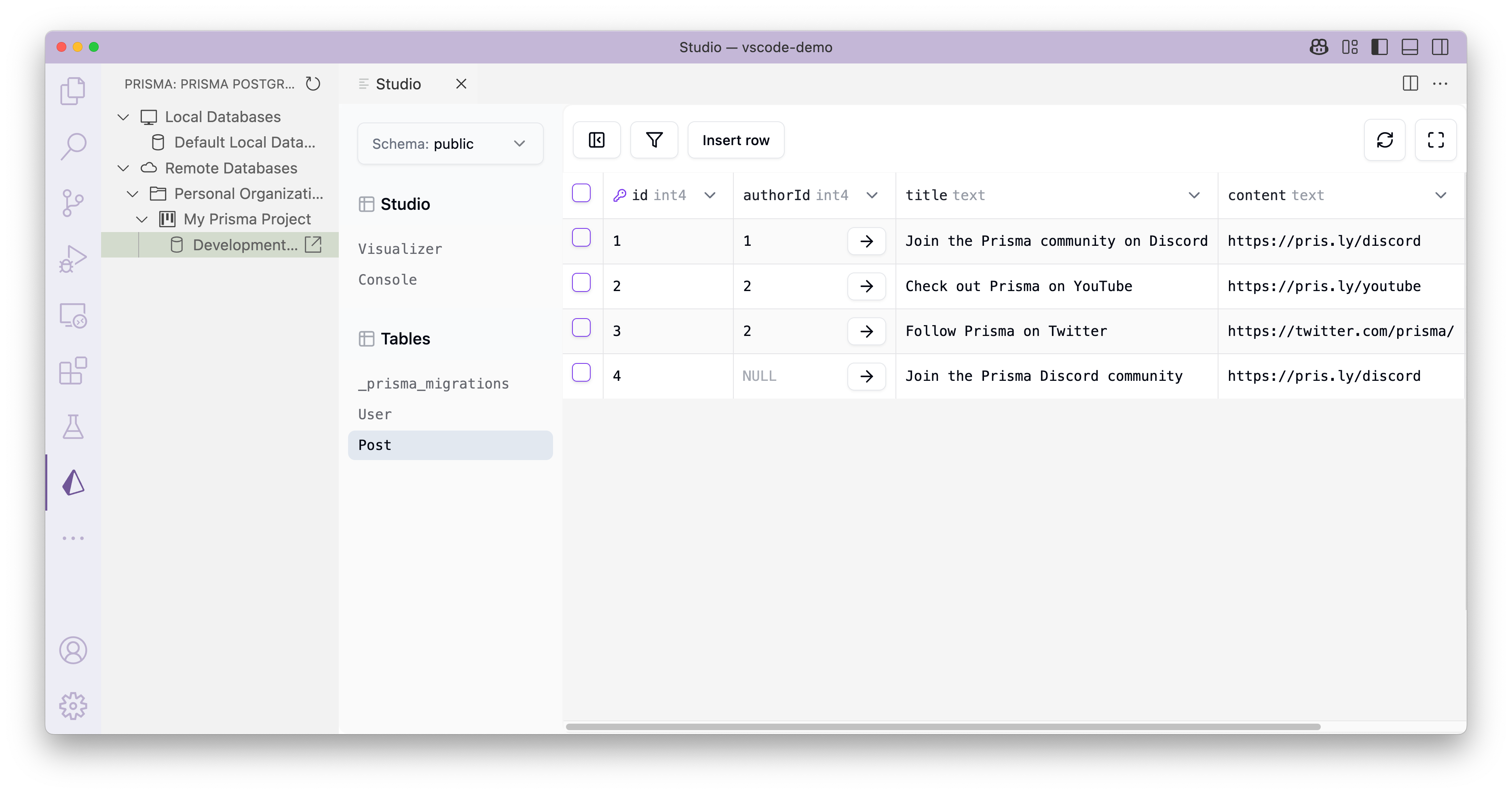
The Prisma VS Code extension features a database managent UI that you can access via the Prisma logo in the sidebar. It allows to manage Prisma Postgres instances:
- ›Authenticate with the Prisma Console
- ›Create and delete Prisma Postgres instances (remote & local)
- ›View and edit data via an embedded Prisma Studio
- ›Visualize your database schema
###Editor support
- ›Syntax highlighting of
schema.prisma - ›Linting
- ›Diagnostic tools are used to surface errors and warnings in your schema file as you type.
- ›Code Completion
- ›Completion results appear for symbols as you type.
- ›You can trigger this manually with the
Ctrl+Spaceshortcut.
- ›Documentation help
- ›Documentation of a completion result pops up as completion results are provided.
- ›Quick info on hover
- ›Documentation Comments (
///) of models and enums appear anywhere you hover over their usages.
- ›Documentation Comments (
- ›Go to Definition
- ›Jump to or peek a model or enum's declaration.
- ›Formatting
- ›Format code either manually or on save (if configured).
- ›To automatically format on save, add the following to your
settings.jsonfile:"editor.formatOnSave": true - ›To enable formatting in combination with
prettier, add the following to yoursettings.jsonfile:
or use the Prettier plugin for Prisma"[prisma]": { "editor.defaultFormatter": "Prisma.prisma" },
- ›To automatically format on save, add the following to your
- ›Format code either manually or on save (if configured).
- ›Rename
- ›Rename models, enums, fields and enum values
- ›Click into the model or enum, press
F2and then type the new desired name and pressEnter - ›All usages will be renamed
- ›Automatically applies
@mapor@@mapon the schema
- ›Click into the model or enum, press
- ›Rename models, enums, fields and enum values
- ›Quick-fixes
- ›Quickly fix typos in model and enum names
- ›Create new models and enums with a single click
##Preview
The database management UI gives you a visual way to perform various database workflows.
Syntax highlighting eases visual comprehension of the Prisma schema.

Formatting ensures consistent indentation of your models for better readability.

Linting shows inline errors in the schema, and autocompletion assists in defining the correct type.

Contextual suggestions assist in defining field types, models, and relations while formatting automatically defines back relations.

Easily navigate definitions, i.e. models in the Prisma schema.

##Contributing
Read more about how to contribute to the Prisma VS Code extension
##Telemetry
This extension collects telemetry data to help us better the usage of the extension. You can read more about that in Prisma's documentation. The extension respects:
- ›the
telemetry.enableTelemetrysetting in VS Code (deprecated since v1.61). - ›the
telemetry.telemetryLevelsetting in VS Code (see docs)
If you want to opt out of telemetry you can either, in your VS Code settings:
- ›set
"telemetry.enableTelemetry": false - ›set
"telemetry.telemetryLevel": "off"(or "crash" or "error")
##Build information
This is for Prisma CLI 7.9.0-dev.4.
##Security
If you have a security issue to report, please contact us at security@prisma.io
// Install
Open this extension directly in your IDE — no CLI, no extra tools.
prisma.prismaIf your IDE doesn't open automatically, copy the ID above and paste it into the Extensions view (⌘P → ext install <id>).
// Source signals
- Publisher
- Verified ✓
- Rating
- 5.0 (3)
- Downloads
- 1.4M
- Published
- 2026-09-14
- License
- Apache-2.0
- Source
- repo
- Homepage
- link
Live from open-vsx.org. Refreshed hourly.
// Are you the author?
This listing is mirrored from Open VSX. Claim it to ship a native OXP build, customise the page, and respond to reviews.
Claim this listing// Package Info
- Version
- 31.11.0
- Owner
- @vsx-prisma
- Downloads
- 1.2M
- Stars
- 0